Building a Spec-Driven Development Plugin for Claude Code
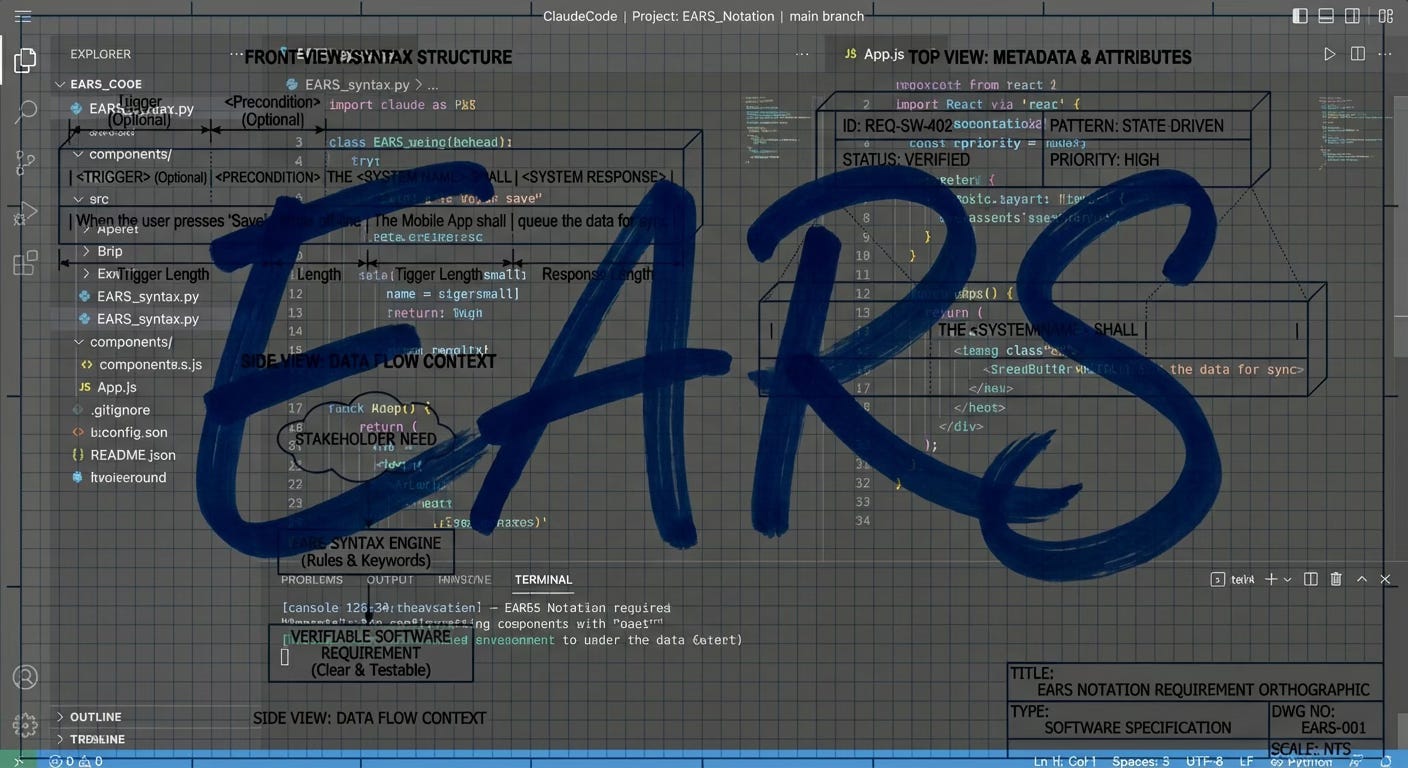
I've been using Claude Code extensively, and one thing kept bothering me: jumping straight into implementation without proper planning. We've all been there—you start coding a feature, realize halfway through that you missed a requirement, then refactor, then discover an edge case that breaks your design.
So I built a plugin to fix that. Inspired by Kiro's spec-driven approach, I created a Claude Code plugin that forces you (in a good way) to think through Requirements, Design, and Tasks before writing a single line of code.
The Problem with "Just Start Coding"
When you ask Claude to build a feature, it's eager to help. Sometimes too eager. It'll start writing code immediately, making assumptions about:
- What the user actually wants
- How the feature should behave in edge cases
- What the data model should look like
- How it integrates with existing code
The result? You end up with code that works for the happy path but falls apart when reality hits.
Enter Spec-Driven Development
The idea is simple: before implementation, create a formal specification that covers:
- Brainstorm — What are we even building? (Conversational exploration)
- Requirements — What should the system do? (Using EARS notation)
- Design — How will we build it? (Architecture, data models, APIs)
- Tasks — What are the discrete steps? (Trackable, dependency-aware)
Only after these phases are complete do you start writing code. And here's the key: Claude can still do all the heavy lifting, but now it's guided by a structured spec.
How the Plugin Works
Installation
Add this to your ~/.claude/settings.json:
{
  "enabledPlugins": {
    "spec-driven@spec-driven": true
  },
  "extraKnownMarketplaces": {
    "spec-driven": {
      "source": {
        "source": "url",
        "url": "https://github.com/Habib0x0/spec-driven-plugin.git"
      }
    }
  }
}
Restart Claude Code, and you'll have access to nine commands.
The Commands
| Command | Purpose |
/spec-brainstorm | Brainstorm a feature idea through conversation |
/spec <feature-name> | Start a new spec with the 3-phase workflow |
/spec-refine | Update requirements or design |
/spec-tasks | Regenerate tasks from the spec |
/spec-status | Check progress |
/spec-validate | Validate completeness and consistency |
/spec-exec | Run one autonomous implementation iteration |
/spec-loop | Loop implementation until all tasks complete |
/spec-team | Execute with agent team (4 specialized agents) |
Phase 0: Brainstorming
Sometimes you're not ready for a formal spec. You have a vague idea—"better error handling" or "some kind of notification system"—but it needs refining before you can write requirements.
That's what /spec-brainstorm is for. It's a conversational back-and-forth where Claude acts as a thought partner:
/spec-brainstorm better error handling
Claude will:
- Ask probing questions ("What kinds of errors are you seeing? Where do they occur?")
- Read your codebase to understand context and constraints
- Suggest alternatives you might not have considered
- Challenge assumptions ("Do users really need to see technical details?")
- Help you identify scope boundaries
The conversation continues for as many rounds as you need. When the idea feels solid, Claude asks "Ready to formalize this into a spec?" and outputs a structured brief:
## Feature Brief: Centralized Error Handling

### Problem Statement
Errors are handled inconsistently across the app, leading to poor UX and difficult debugging.

### Proposed Solution
A centralized error boundary with consistent UI and structured logging.

### Key Behaviors
- All API errors show user-friendly messages
- Errors are logged with request context
- Users can report errors with one click

### Out of Scope
- Retry logic (separate feature)
- Error analytics dashboard
That brief becomes your starting point for /spec. The brainstorm phase is optional—if you already know exactly what you want, skip straight to /spec.
Walkthrough: Building a User Authentication Feature
Let's say you want to add user authentication to your app. Instead of asking Claude to "add login functionality," you run:
/spec user-authentication
Claude will guide you through each phase.
Phase 1: Requirements
First, Claude asks clarifying questions:
- What authentication methods? (email/password, OAuth, magic links?)
- What user roles exist?
- Password requirements?
- Session handling?
Then it writes user stories with EARS notation (Easy Approach to Requirements Syntax):
### US-1: User Login

**As a** registered user
**I want** to log in with my email and password
**So that** I can access my account

#### Acceptance Criteria (EARS)

1. WHEN a user submits valid credentials
   THE SYSTEM SHALL authenticate the user and create a session

2. WHEN a user submits invalid credentials
   THE SYSTEM SHALL display an error message without revealing which field was incorrect

3. WHEN a user fails authentication 5 times
   THE SYSTEM SHALL lock the account for 15 minutes
Notice how each criterion is testable and unambiguous. No vague words like "quickly" or "properly."
Phase 2: Design
With requirements locked, Claude produces the technical design:
- Architecture Overview — Components and their relationships
- Data Models — User schema, session schema
- API Design — Endpoints, request/response formats
- Sequence Diagrams — Login flow, token refresh flow
- Security Considerations — Password hashing, rate limiting, CSRF protection
This phase catches architectural issues before you write code. "Wait, should we use JWTs or server-side sessions?" gets answered here, not during a midnight debugging session.
Phase 3: Tasks
Finally, Claude breaks down the design into trackable tasks. Each task now tracks three states: Status (is the code written?), Wired (is it connected to the app?), and Verified (has it been tested end-to-end?):
### T-1: Set up authentication dependencies
- **Status**: pending
- **Wired**: n/a
- **Verified**: no
- **Requirements**: US-1, US-2
- **Description**: Install bcrypt, jsonwebtoken, set up middleware structure
- **Acceptance**: Dependencies installed, middleware skeleton in place
- **Dependencies**: none

### T-2: Implement User model
- **Status**: pending
- **Wired**: n/a
- **Verified**: no
- **Requirements**: US-1
- **Description**: Create User schema with email, passwordHash, loginAttempts, lockedUntil
- **Acceptance**: Model created with validation, indexes on email
- **Dependencies**: T-1

### T-3: Implement login endpoint
- **Status**: pending
- **Wired**: no
- **Verified**: no
- **Requirements**: US-1
- **Description**: POST /auth/login with rate limiting and account lockout
- **Acceptance**: All US-1 acceptance criteria pass
- **Dependencies**: T-1, T-2

### T-4: Wire login form to authentication endpoint
- **Status**: pending
- **Wired**: no
- **Verified**: no
- **Requirements**: US-1
- **Description**: Connect login form submission to POST /auth/login. Display success/error. Store JWT. Redirect to dashboard.
- **Acceptance**: User can click Login, enter credentials, submit, and see dashboard or error
- **Dependencies**: T-3
Notice the mandatory Integration phase (tasks like T-4). Every backend endpoint gets a corresponding wiring task that connects it to the frontend. More on why this matters below.
These tasks sync to Claude Code's built-in todo system, so you can track progress as you implement.
The Spec Files
Everything gets saved to .claude/specs/user-authentication/:
.claude/specs/user-authentication/
├── requirements.md   # User stories + EARS criteria
├── design.md         # Architecture documentation
└── tasks.md          # Implementation tasks
When you later work on this feature, Claude automatically loads these files as context. It knows what you're building, why, and what's left to do.
Why EARS Notation?
EARS (Easy Approach to Requirements Syntax) forces you to write testable requirements. The format is:
WHEN [condition/trigger]
THE SYSTEM SHALL [expected behavior]
Variations include:
WHILE [state]— For ongoing conditionsIF [condition], WHEN [trigger]— For conditional behaviorTHE SYSTEM SHALL NOT— For negative requirements
This eliminates ambiguity. Compare:
❌ "The system should handle errors gracefully"
✅ "WHEN an API request fails after 3 retries, THE SYSTEM SHALL display a user-friendly error message and log the failure details"
Validation
Before implementation, run /spec-validate. The plugin checks:
- All user stories have EARS acceptance criteria
- Design addresses every requirement
- Tasks trace back to requirements
- No circular dependencies in tasks
- No vague language ("fast", "easy", "properly")
If something's missing, you fix it in the spec—not in the code.
Phase 4: Autonomous Execution
Planning is great, but at some point you need to build the thing. The latest update adds two execution modes that let Claude implement your spec autonomously—one task at a time, with commits along the way.
This is based on the "Ralph loop" technique: build a prompt from your spec files, hand it to Claude with --dangerously-skip-permissions, and let it work. Each iteration, Claude picks the highest-priority task, implements it, runs tests, updates the spec, and commits. Simple and effective.
Single Iteration: spec-exec
spec-exec.sh --spec-name user-authentication
Claude reads your spec, picks one task, implements it, and commits. You review the result, then run it again for the next task. Good for when you want to stay in the loop.
Loop Until Done: spec-loop
spec-loop.sh --spec-name user-authentication --max-iterations 20
This wraps the same logic in a while loop. Each iteration re-reads the spec files (picking up changes from the previous run), runs Claude, and checks the output for a completion signal. When Claude sees all tasks are done, it outputs <promise>COMPLETE</promise> and the loop exits.
You get progress output each round:
=== Spec Loop: Iteration 1 / 20 ===
... Claude implements T-1, commits ...
--- Iteration 1 done. Continuing... ---

=== Spec Loop: Iteration 2 / 20 ===
... Claude implements T-2, commits ...
--- Iteration 2 done. Continuing... ---

=== Spec Loop: Iteration 3 / 20 ===
... Claude sees all tasks complete ...
All tasks complete!
Ctrl+C to stop early. The --max-iterations flag (default: 50) prevents runaway loops.
Why This Works
The spec is the contract. Each Claude invocation gets the full context—requirements, design, and the current state of tasks. It knows what's been done and what's left. Because the spec files are updated and committed each iteration, the next run picks up exactly where the last one left off.
No state files, no databases, no complex orchestration. Just spec files, a bash script, and Claude.
The Integration Problem (and How We Fixed It)
After running spec-loop on a few projects, I noticed a pattern: tasks were getting marked "completed" and "verified," but the app didn't actually work. Claude would create a beautiful component, write a backend endpoint, even run some tests—then mark everything done. But nobody could reach the feature because it was never wired into the application.
The component existed in a file somewhere. The endpoint was defined. But the route wasn't registered, the navigation had no link to the page, and the form didn't call the API. Everything worked in isolation. Nothing worked together.
The Wired Field
The fix was adding a new tracking dimension. Tasks now have three states instead of two:
pending → in_progress → completed (code written)
                         → Wired: yes (code connected to app)
                         → Verified: yes (tested end-to-end)
A task is only truly done when all three are satisfied. The Wired field asks a simple question: can a user actually reach this feature?
no— Code exists but isn't connected to the applicationyes— Code is reachable from the app's entry pointsn/a— Infrastructure task with nothing to wire (database setup, config, tests)
Mandatory Integration Phase
The task generator now always includes a Phase 3: Integration between Core Implementation and Testing. For every backend task, it generates corresponding wiring tasks:
- "Wire login form to authentication endpoint"
- "Add dashboard route to router and navigation"
- "Connect profile page to user API"
These tasks have concrete acceptance criteria like "User can click Dashboard in the sidebar and see the dashboard page"—not vague statements like "feature is integrated."
Enforcement in the Loop
The execution prompts (spec-loop, spec-exec, spec-team) now enforce a mandatory integration check before testing:
- Implement — Write the code
- Wire it in — Connect to routes, navigation, API calls
- Integration check — Can a user reach this feature? If not, fix the wiring before proceeding
- Test — Verify end-to-end through the UI
- Commit
The key rule: if the code is NOT wired in, DO NOT proceed to testing. This prevents the main failure mode where tasks get marked complete but nothing works.
Agent Teams: When You Need Real Verification
There's a second problem beyond integration: the same Claude that writes the code also verifies it. It's easy for it to convince itself that something works when it doesn't.
The solution? Agent teams. Instead of one agent doing everything, you spawn specialized agents that check each other's work.
The Team
| Agent | Model | Role |
| Implementer | Sonnet | Writes code AND wires it into the app |
| Tester | Sonnet | Integration check first, then end-to-end verification with Playwright/tests |
| Reviewer | Opus | Code quality, security, architecture, AND integration completeness |
| Debugger | Sonnet | Fixes issues — specializes in finding wiring gaps |
The Flow
1. Lead picks task T-1, assigns to Implementer
         ↓
2. Implementer writes code + wires it in, marks Wired: yes
         ↓
3. Lead assigns to Tester
         ↓
4. Tester checks integration first (can a user reach this?)
         ↓
   NOT WIRED → Debugger    WIRED → Run tests
         ↓                       ↓
   Debugger fixes wiring   PASS → Reviewer        FAIL → Debugger
                                  ↓                       ↓
                            Reviewer checks code    Debugger fixes
                                  ↓                       ↓
                            APPROVE → Commit       Back to Tester
                            REJECT → Debugger
The key insight: the agent that writes code is NOT the agent that verifies it. The Tester first checks that the feature is reachable from the app—navigating from the main entry point through normal UI interactions, not direct URLs. Then it uses Playwright to test the actual functionality. The Reviewer (running on Opus) catches security issues, architectural drift, and missing integration points. The Debugger has a wiring diagnostic checklist as its first tool—tracing the chain from entry point to router to component to API call to endpoint to database and back.
Running with Agent Teams
spec-team.sh --spec-name user-authentication
This spawns all four agents and coordinates them through the full cycle for each task. It costs more tokens (~3-4x) but catches issues that single-agent mode misses.
Running Multiple Projects
One issue I hit early: running /spec-team on Project A, then starting it on Project B would kill Project A's team. The original script used basename $(pwd) for team names—so two projects both called app would collide.
The fix uses a SHA-256 hash of the full project path for team names, plus PID-based liveness checks. Now each project gets its own isolated team. If you try to start a second team on the same project+spec, it warns you and shows the PID of the running process instead of silently killing it. Dead teams from crashed sessions get cleaned up automatically on next run.
When to Use Teams vs Single Agent
Use /spec-team when:
- Tasks keep getting marked complete without working
- Security-sensitive features (auth, payments)
- Complex multi-component features
- You want code review before every commit
Use /spec-loop when:
- Simple, straightforward tasks
- Token budget is a concern
- You're monitoring closely anyway
Both modes now enforce integration checking—the Wired field and mandatory wiring step apply to all execution modes, not just agent teams.
This is based on Anthropic's research on long-running agents. They found that separating implementation from verification dramatically improves reliability. The agent team pattern takes that a step further by making verification a completely separate agent.
When to Use This
Spec-driven development adds overhead. It's not for every task. Use it when:
- Building a new feature with multiple components
- The requirements aren't crystal clear
- Multiple people will work on the implementation
- You need documentation for future reference
- The feature touches security, payments, or other sensitive areas
Skip it for:
- Quick bug fixes
- One-line changes
- Prototypes you'll throw away
Try It Out
The plugin is open source:
GitHub: github.com/Habib0x0/spec-driven-plugin
Install it, run /spec on your next feature, and let me know what you think. I'm particularly interested in:
- Edge cases I haven't handled
- Improvements to the EARS templates
- Integration ideas (Jira? Linear? GitHub Issues?)
This plugin was inspired by Kiro's spec-driven development functionality. If you haven't checked out Kiro, it's worth a look—they've thought deeply about how AI should assist with software planning.
Updates
2026-02-18 — Integration enforcement and cross-project fix. Running spec-loop on real projects exposed a major gap: Claude would implement tasks in isolation — writing components, creating endpoints, even passing tests — then mark everything done. But the features were never wired into the application. Routes weren't registered, navigation had no links, forms didn't call APIs. Everything existed in files, nothing worked together. Added a Wired field to task tracking, a mandatory Integration phase in task generation, and integration checks in all execution modes. Agents now enforce wiring before verification. Separately, fixed spec-team killing active teams in other projects when two projects shared the same directory basename.
About the author
Platform & security engineer with 10+ years in cloud infrastructure and offensive security. Currently building AI-powered cybersecurity automation and researching AI agent security on the side. Background in red teaming, incident response, and penetration testing across enterprise and government environments.
I write about AI agent security, cloud infrastructure hacking, and the gaps between how systems are designed and how they actually behave.
Comments
Join the discussionNo comments yet. Be the first to comment.